

AI listens to every call and scores it
Each call becomes text. Who left the script, which objection went unanswered, how the customer felt: the manager sees it all in one list.
- A transcript of every call
- Script and objection checks
- Customer mood
For small and mid-sized businesses in Uzbekistan
Telegram messages, calls, sales, stock and debts in one system. Your whole business in view, on your phone or computer.
Free for 14 days. We help you set it up.
Sound familiar?
Six everyday problems and how they get solved. Further down: what else Fast-CRM can do.
The fix
Everyone who writes to your bot lands in one list and reaches the right person. You reply from right there.
The result: An unanswered message can no longer hide.
The fix
A sale on credit is written to the debt book on its own. When a payment comes in, the balance is recalculated.
The result: You see who owes what at a glance.
The fix
Every customer, deal and task has an owner and a due date. The work sits on a board, stage by stage.
The result: You see straight away where work is stuck.
The fix
Your office phone system is connected. Every call stays on the customer’s card, and you can play the recording.
The result: Who called, and what was said, is kept.
The fix
Every item sold at the till comes off the stock on its own. Products are found fast by barcode.
The result: You know what is left in stock at any moment.
The fix
Customers, messages and calls live in the company’s database, not on an employee’s phone.
The result: The customer base stays with your company.
What it can do
Each call becomes text. Who left the script, which objection went unanswered, how the customer felt: the manager sees it all in one list.

You meet in Fast Meet, right in the browser. AI writes up the meeting and opens the tasks with owners and deadlines.

Wherever a customer writes from, it lands in one window and gets an answer. Telegram, email and SMS work today.

Write a few lines, AI drafts the site, and you edit it without code. A request from the site’s form lands in the CRM at once.

Describe a process in plain words and AI drafts the automation rule and finds its mistakes. A draft reply and a summary of the customer’s history are one click too.

Sales, revenue, debts and funnel conversion are there when you sign in. Ask for a chart in words and AI builds it.
Who it is for
Every trade has its own way of working. The system adapts to yours, not the other way round.
The till, stock and debt book are linked. Make a sale and the stock and debts update on their own.
Orders, quotes and invoices in one place. Which customer owes how much, visible every day.
Every application is tracked stage by stage. You see which applicants nobody has spoken to yet.
Appointments, calls and reminders in one calendar.
Every request has an owner and a deadline, and anything late shows up at once.
Tell us how you work and we will set the system up around it.
Works with the services you already use
Customer messages
Telegram, email and SMS land in one window, and you reply from there. No message gets stuck on an employee’s personal phone.
Whoever writes is added to your list at once.
Each email attaches itself to that customer’s card.
Reminders and messages through Eskiz or Play Mobile.
Send an offer or news to the right customers in one go.
Till, stock and debts
What you sell comes off the stock, and a sale on credit goes into the debt book, on their own. No more evenings checking the notebook against the till.
With a touch screen and a barcode scanner.
Stock updates itself after every sale.
Who owes what and when they paid. SMS reminders if you want them.
Send the customer a payment link.
Calls
Your office phone system (Asterisk or FreePBX) is connected, and the customer’s card opens by itself when they call. Every call is recorded.
See the customer’s name and history before you answer.
No desk phone needed.
What was agreed is never forgotten.
Who made how many calls, in one place.
Routine work
Set a rule once: when a deal moves on, someone gets a task and the customer gets a message. Describe it in plain words and AI drafts the rule.
When something changes, or at a set time.
To the customer by SMS, email or Telegram.
A manager approves a discount or an expense in one click.
Getting started
Step 1
You leave your name and phone number. We call you and ask how your business works.
Step 2
We shape the customer list, sales stages and the sections you need around how you work, and help bring over your Excel sheets.
Step 3
Staff sign in from a phone or computer and work from day one. You see the whole business on one screen.
In short
Inside the product
Real screens, nothing staged.
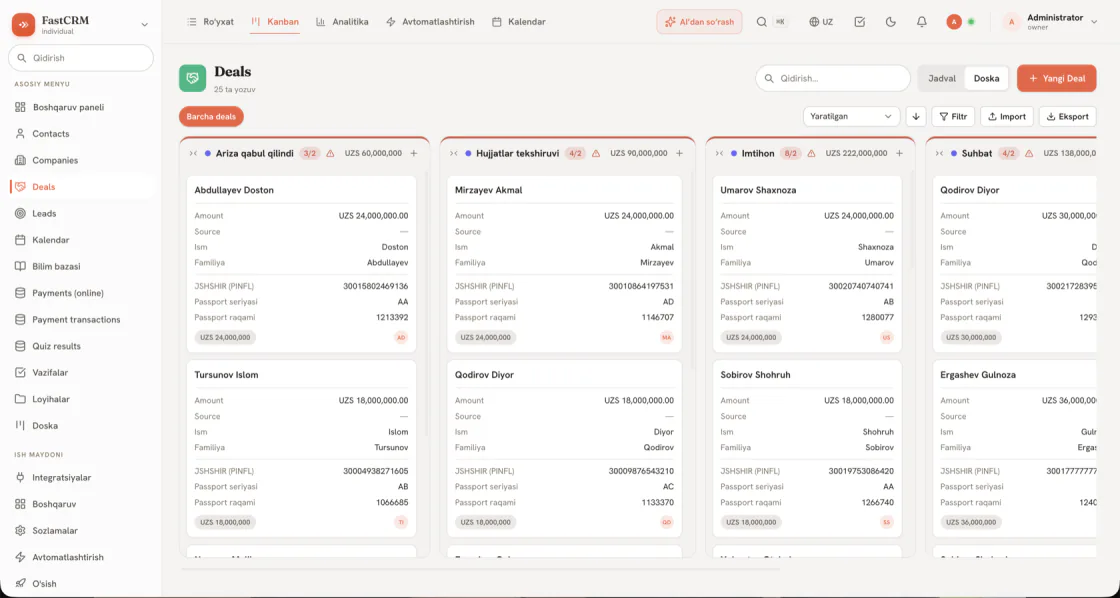
Which stage every deal is at, and how much money sits at each stage.
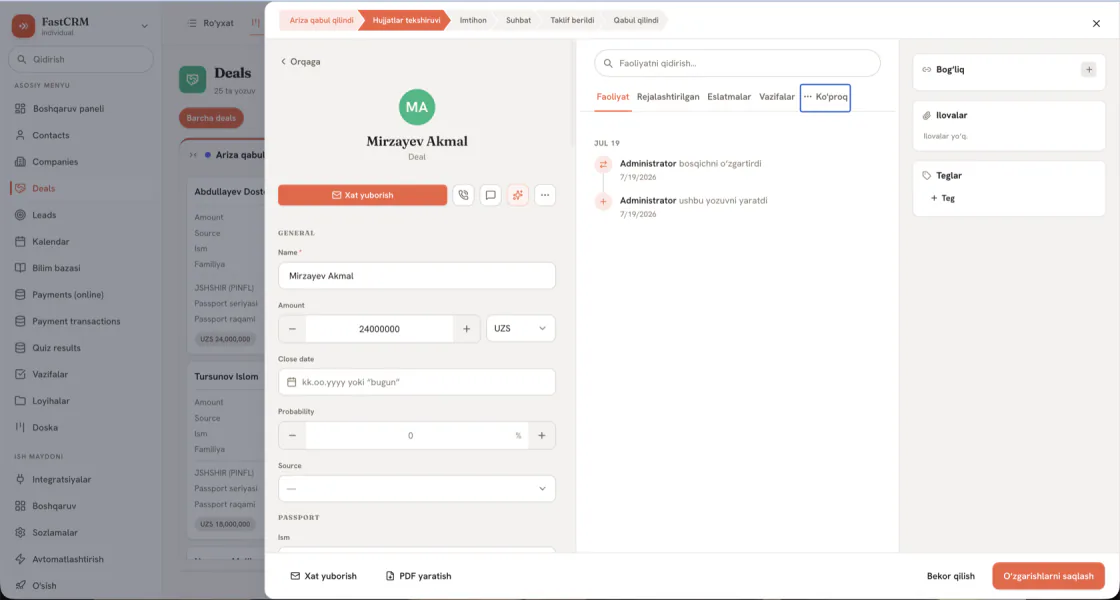
Everything about a customer: details, messages and call history.
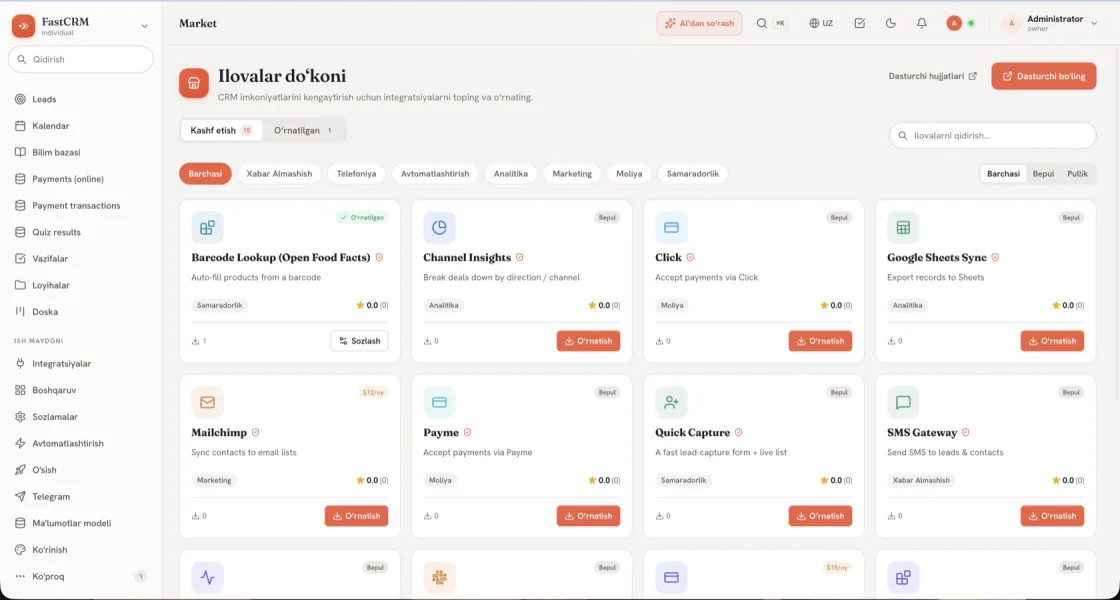
Connect Payme, Click, SMS and other services in one click.
Security
Each employee sees only their own work, and you decide who sees what. If you prefer, it runs on your own server.
Managers see everything, staff see their own.
A code from your phone is asked for along with the password.
No other company can see your data.
The data never leaves your company.
Pricing
The price depends on how many staff use it and which sections you need. Leave a request and we will work it out.
On requestbilled monthly
On requestlicence
Add-ons such as Payme and Click are connected separately: some are free, others are a monthly subscription.
Questions
The price depends on how many staff use it and which sections you need, so we work it out for each business. Leave a request and we will give you an exact price. You can try it free for 14 days first.
Yes. The cloud service runs under a public offer, and we can also sign a separate contract with your company. You pay by bank transfer against an invoice or via Payme and Click, and we issue a tax invoice (hisob-faktura) for your payments.
The number of users depends on your plan: the price is based on how many people use it. When your team grows, you move to a bigger plan and add new staff right away, and your data stays where it is.
The cloud version runs over the internet: you sign in from a browser on your phone or computer. Installed on your company’s server, it runs inside your office network. Outside services such as Telegram, SMS and payments still need internet.
Each company’s data is kept separately and no one else can see it. Inside your company you decide who sees what, and you can switch on two-step sign-in.
In the cloud version: in a data centre in Germany (Contabo GmbH servers), with a database backup taken every day. In the version on your own server: the data stays entirely with you. More in the privacy policy.
Yes. In the cloud version a database backup is taken automatically every day. In the version on your own server we set up backups together during installation.
Yes. There is a licensed version that runs on your company’s server, so your data never leaves you. We help with the installation.
We open your trial workspace after you send a request. How long the full setup takes depends on how much you need: we give you an exact plan and timeline at the demo.
Yes. Save your Excel sheet as CSV and upload customers, products and other lists: you match the columns and preview the result first. There is a ready module for linking with 1C. We help with the move.
No. We set it up at the start; after that you add a new section, column or stage yourself in the settings.
Today Telegram, email and SMS connect. We are working on Instagram, WhatsApp and other channels and will say so here once they are ready.
Yes. Connect Payme or Click and send the customer a payment link.
An Asterisk or FreePBX phone system in your office is enough. We install a small program next to it and calls start showing up in the CRM.
Write to info@fastcrm.uz or leave a request with the form on this page, and we will answer shortly. At launch we help with the setup and with moving your data.
Yes, the data is yours. You can export any list to CSV at any time. If you stop using the service, we prepare a full export of all your data, and then it is deleted from the server.
For your IT team
Show this part to your IT specialist.
Objects, 43 field types, statuses and page layouts are changed in the settings.
A visual canvas: 20 triggers, 18 actions.
Scoped API keys and per-key request logs.
Roles, field-level permissions and ABAC rules.
Google, Microsoft or any OIDC provider.
The customer edition runs on your own server, on PostgreSQL.
Plug in any LLM provider.
A built-in 1C module and CSV import.
Get started
Leave a request: we will call, give you a demo or open a free 14-day trial.
We use your details only to get back to you.


